
Everything Ohenry can do
A full tour of what's built today, everything it connects to, and what's on the way. Beta Release owners get every new feature free, for life.
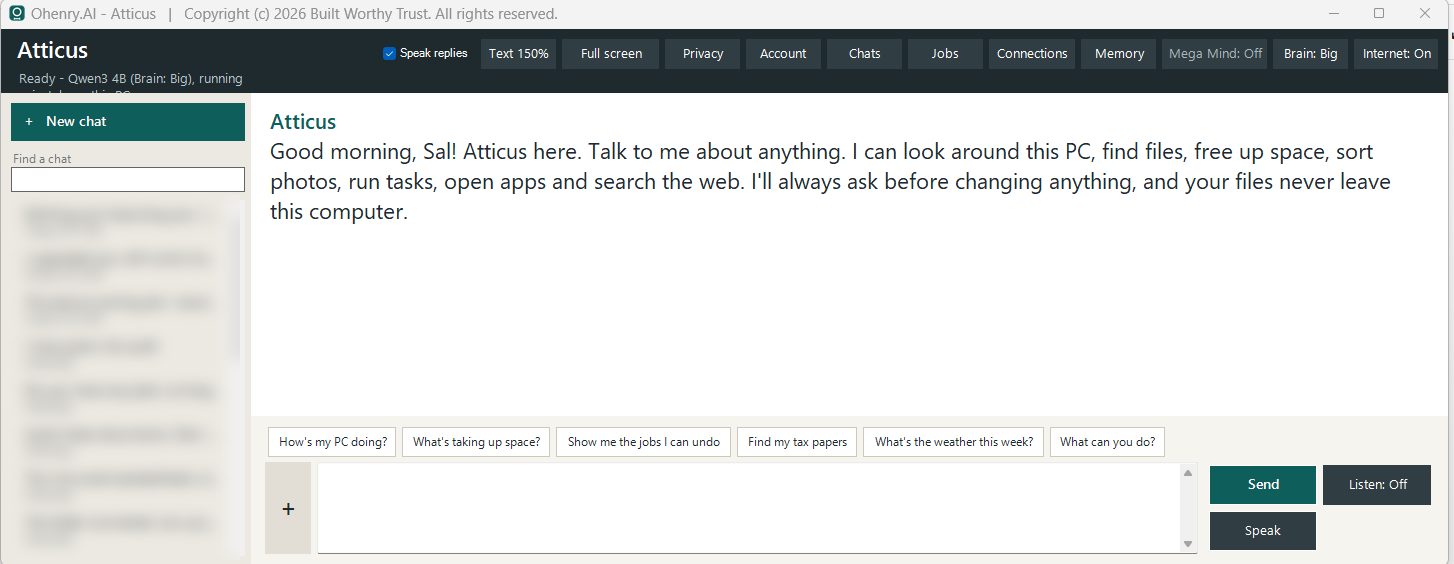
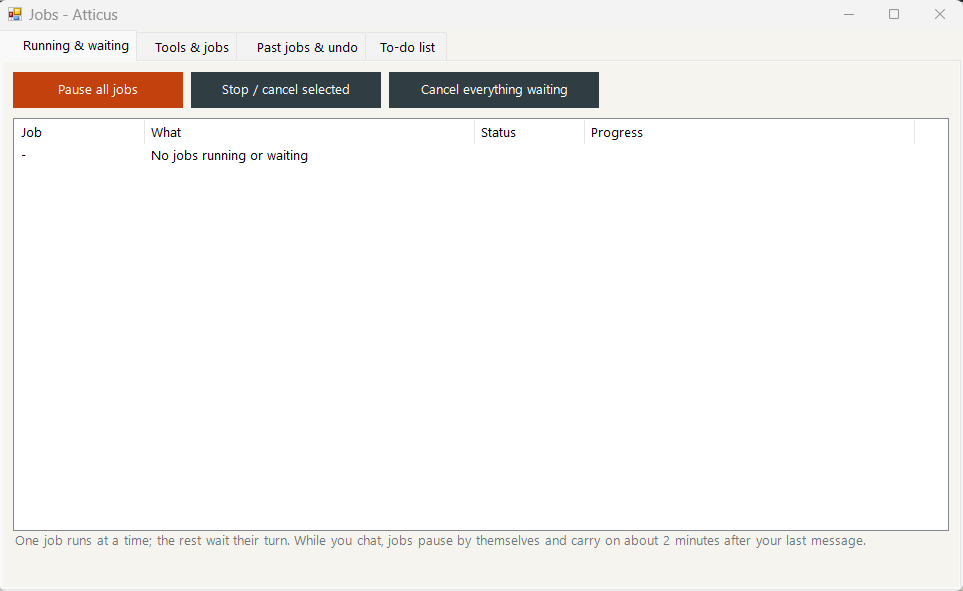
A look at Ohenry
Real screens from the Windows app (Beta).
What Ohenry can do
Each Ohenry chooses its own name, voice and personality, then gets to work. Pick what you would use it for.
A butler for the whole household: one Ohenry for each person, one memory for the family, and nothing personal leaving your home.
47 capabilities in 11 groups
Talking and thinking 5
- Chat about anything, by typing or by voice, and hear the answers out loud
- Reasons problems through, and asks one short question when something is unclear
- Exact math, every time (it uses a real calculator)
- Reads and describes photos, letters and scanned pages
- Looks through the camera, only when you ask it to
Languages 3
- Talks with each person in their own language - 30 to choose from
- Translates emails, texts and web pages from family and friends abroad
- Interpreter mode: two people, two languages, every line translated and spoken live
Memory 6
- Goes everywhere you go: one Ohenry and one memory on your phone, PC, tablet and hub (up to 6 machines each)
- Remembers what matters to each person, and to the family
- Follows each person's preferences
- Finds things you talked about before
- Forgets only when the family's master says so
- Keeps a private log of everything it did and was asked
Photos and files 4
- Groups years of photos into events by date
- Sorts loose photos, tidies Downloads and the Desktop, and gathers bills in one place
- Always shows its plan first, and only moves things with your yes
- Undoes any tidy-up and puts every file back
Home and phone 6
- Reads your inbox and writes email drafts - it never sends without you
- Shows the family calendar
- Says who is calling, and answers or declines when told
- With a home hub: answers the family phone line and sums up each call
- Switches home devices with Home Assistant
- Keeps the family to-do list, with priorities and due dates
Keeping the PC healthy 4
- Health check, clean-up, drive tune-up, Windows repair and security scan
- Speed check, and shows what is eating memory - essential or not
- Closes programs nobody needs (with your yes), and lets helpers sleep while it thinks
- Never touches Windows itself, security software, calls or itself
Family tree and groups 5
- Build your family tree, or bring it in from a .ged file (GEDCOM) - from Ancestry, FamilySearch and other tree programs
- Invite your family: each person gets a free personal key that stays theirs, and the tree arrives on their PC and phone when they sign in
- The family's administrators and managers are in charge: they invite, set each person's part, and keep the shared tree
- Ohenry adds relatives and corrects names, dates and phone numbers when you ask - always with your yes
- Join your family and a business with the same key - each kept separate and private
Nothing you make is lost 3
- Every saved version of your work is kept - the family tree, designs, projects and tasks
- Put back any earlier version in a click, or just ask Ohenry
- Updates never touch your work, and anything missing is put back on its own
The Common Library 3
- General know-how shared by Ohenry AIs for every family in the world - how-tos, codes, fixes
- Nothing personal ever goes in: names, prices and details are taken out, then every item is checked and approved
- Sharing is up to you, one item at a time; every Ohenry can look up what is approved
The family network 4
- With a home hub, everyone's Ohenry shares what it learns: one family, one memory
- Uses the hub's bigger brain when it is switched on
- Members-only Family Directory, if your family chooses to say hello
- Each Ohenry picks its own name, voice and personality
Values, always on 4
- Protecting children comes first, in every install
- Someone in crisis is given care and help - never reported
- Privacy first: nothing personal leaves your family's network
- It changes things only with your yes
An office assistant that runs on your own machines: it reads, drafts, organizes, translates and researches - and your business data stays yours.
51 capabilities in 11 groups
Documents and spreadsheets 5
- Reads documents for real: PDFs, Word files and scanned pages
- Reviews a whole folder of documents page by page and saves notes
- Reads spreadsheets, finds matching rows and gives exact totals
- Creates Word documents and Excel spreadsheets with working formulas
- Organizes project folders, invoices and receipts - plan first, then your yes
Ohenry Design - kitchens and cabinets 7
- Draw the room, place cabinets from real manufacturer catalogs, and see wall elevations and 3D
- Catalogs converted for each store - boxes, SKUs and descriptions, with colors, finishes, textures and door styles
- Countertops and backsplash shaped to the room, priced by the slab or the square foot, with fabrication and installation
- Trims and fillers, and your own materials
- Price with a percent markup or discount set by the business - a line-by-line price only when you need one
- Send the quote to Zoho Books as an estimate: SKU, description and your selling price
- A second window to present the design and price to your customer
Projects and tasks 3
- A project manager for jobs and tasks, kept in sync with Zoho CRM (deals and tasks)
- Start a project from a workflow and its stages come in as tasks
- Assign project managers and roles from your business directory
Your business directory 4
- Your business tree: companies, branches, clients and suppliers, with logos, contacts and roles
- Shared with your team when they sign in; owners, partners, executives and managers keep it up to date
- Ohenry adds a business or a contact, or corrects details, when you ask - with your yes
- Every saved version of designs, projects and the directory is kept - nothing is lost to a mistake or an update
Customers in any language 5
- Translates customer and supplier emails into your language
- Writes replies in the customer's language, with your copy alongside
- Remembers which language each contact uses
- Interpreter mode for meetings and calls: each line translated and spoken live
- Keeps names, prices, numbers and dates exact, in a business tone
Email, calendar and calls 4
- Reads the inbox across Outlook, Gmail, Yahoo, iCloud and Ohenry Mail
- Writes drafts - never sends on its own
- Shows the calendar and keeps the task list
- With a business hub: answers the office line and sums up each call
Research and background jobs 5
- Searches the web and researches across several sources, with citations
- Runs low-priority jobs in the background - research, reading, comparing - and reports back
- Builds a library of your files and saved pages, and searches it first
- Studies law, business and intellectual-property topics from official free sources
- Quotes the law from official sites (it does not give legal advice)
Connects to your tools 4
- Notion, Todoist, Trello and GitHub - with your own free key
- Opens popular web apps by category
- Runs PowerShell commands for IT tasks, asking first for anything that changes something
- Listed in the public Business Directory, and finds member businesses for you
Trade skills it has learned 6
- Kitchen, bath and cabinet design, including layout planning
- Works with 2020 Design project files
- Blueprint take-offs: perimeters, walls and elevations, tile and flooring quantities
- Business accounting, forensic auditing and audit trails
- Copyright procedures and preparing copyright filings
- WordPress and WooCommerce website building
Your team's network 5
- Each person's Ohenry follows them across up to 10 machines (more for Enterprise), with one memory
- A business hub shares what each Ohenry learns across the team
- Mega Mind: very big jobs split across your servers - only when you switch it on
- Your data stays on your machines, never in someone else's cloud
- The Common Library: general trade know-how shared by Ohenry AIs - never your customers, prices or catalogs
Values, always on 3
- Core values on every install - protecting children comes first
- What is shared on your network is checked against those values; your administrators decide on anything flagged, and it is all recorded
- It changes things only with your yes, and keeps a log of what it did
Trade skills are learned by studying: our own Ohenry, Atticus, has studied these, and every Ohenry can learn them from official sources and the library you give it.
Everything Ohenry connects to
You choose what it may use - and you can switch any of it off.
Email & calendars
Gmail, Outlook, iCloud Mail, Yahoo Mail, AOL Mail and other email; your calendars. Reads your inbox and drafts replies for you to check - it never sends on its own.
Online services
Notion, Todoist, Trello, GitHub and Home Assistant - with your own keys, kept encrypted on your PC. (It won't touch locks, alarms or garage doors.)
Apps on your PC
Excel, Word, 2020 Design and any app you tick in the Apps list - grouped by category, with "Allow all" and "Uncheck all".
Phone
Telnyx, Twilio and Plivo phone lines (with a home hub), SkipCalls call summaries on Android, and Windows Phone Link on your PC.
Websites
Opens your favourites by category: Gmail, Google Calendar, Google Docs and Sheets, Microsoft 365, Google Drive, OneDrive, Dropbox, Asana, Slack, Zoom, Spotify, YouTube, Amazon and more.
Ohenry Mail
Your Ohenry.AI's own mailbox at family.name@, biz.name@ or fab.name@ohenry.ai, on Zoho Mail - an add-on, a year at a time.
Business & Family Directories
List your business for everyone to find, and your family for other Ohenry members - only if you choose. Businesses · Families
Your home network
The home hub links every Ohenry in the house: shared memory, the bigger home brain and - when you switch it on - Mega Mind, sharing big jobs across your devices.
Ohenry answers the phone
With a home hub, Ohenry answers its own phone line - you choose the phone company and forward your cell's missed calls to it.
About the home hub- Says it's an AI assistant and that the call may be transcribed
- Asks who's calling and why, and takes a message
- Notes appointment requests for your calendar
- Puts emergencies straight through to your cell
- No hub? On Android it reads SkipCalls summaries, books appointments and sounds an alarm for emergencies
Family and business, kept apart
- One license covers a Family side and a Business side, completely separate
- Everyone signs in with their own email and a code - up to 6 machines each at home, 10 in a small business, and as many as agreed for Enterprise. One Ohenry, one memory, on every one of them
- The family tree (bring in a .ged file) and the business directory, shared with the people you invite
- A free personal key for everyone, to join their family, a business, or both
- Each Ohenry chooses its own one-of-a-kind name and voice
Private by design
- The AI runs on your computer - nothing about you is uploaded
- No ads, no tracking, no analytics
- Online only when you ask, and only while Internet is on
- Never moves, sends or deletes anything without your yes
- A private activity log of everything it does
Coming soon
Free for every Beta Release owner when they arrive.
Calls that book for you
Ohenry calls to make appointments and reservations - restaurants, services, hotel stays.
Hotel deals
Searches for the best hotel stay and, only when you say so, negotiates the price - checking the details with you first.
More phone companies
VoIP.ms and more, for the phone line.
WhatsApp screening
Screens WhatsApp messages and helps you schedule what they ask for.
Ohenry on your phone
Kept light and clean: sign in with your license, and Ohenry answers calls, reads email and books calendar appointments.
Business Hub
The always-on Ohenry brain for a whole team.
Beta Release: $19.99 $99.99
Limited time. Buy once, own it for life - every update free.